Legacy System Integration: Methods, Risks and a Plan
How to connect legacy systems to modern applications: integration patterns, a step-by-step plan, the risks to manage, and where AI agents fit in.
Legacy system integration is the work of connecting an older core system, such as an ERP, a mainframe application or a custom-built database, to newer tools so that data and actions move between them without manual re-entry. For sales, support and operations teams, the practical goal is narrower than modernization: let a lead, a customer message or an order request reach the legacy system, trigger the correct update, and leave a record. We build custom AI agents that work inside that layer, reading from and writing to ERP and CRM systems under rules mapped to the company’s own data, so the older system keeps doing what it does well while the slow, repetitive handling around it is automated.
TL;DR
- A legacy system is usually a critical system that is outdated in some respect, not simply an old one. Integration keeps it running while new functions use its data.
- The main methods are API wrappers, database-level connections, middleware or message brokers, and, for systems with no usable interface, user-interface automation. Non-invasive methods carry less risk than changing legacy code.
- Plan in this order: inventory, source of truth per data entity, interface constraints, exchange method, failure handling, a narrow pilot, then expansion.
- The biggest risks are unsupported software, unclear ownership of data and a system nobody fully understands. Each can be reduced before build starts.
- AI agents are one way to put the integration to work: they take requests in voice, WhatsApp or email and act on the ERP or CRM through defined rules, with human handoff and logs.
Table of Contents
- What counts as a legacy system
- Integrate or replace
- Methods for connecting legacy systems
- A plan that works in practice
- Risks to manage before you build
- What integration returns
- Where AI agents fit in an integration
- Our perspective
- Getting started with VoxDonna
- FAQ
- Sources
What counts as a legacy system
There is no formal definition. IEEE Spectrum describes a legacy system as a critical system that is outdated in some respect: unsupported by its vendor, fragile, complex, or no longer understood by the people who run it. Age alone does not qualify a system. A fifteen-year-old ERP that is patched, documented and supported is in better shape than a five-year-old custom application whose author has left.
Common examples in mid-sized businesses include:
- an on-premises ERP that cannot be upgraded to a current release without a large project;
- a mainframe or midrange application that holds orders, inventory or billing;
- a custom-built database with no documented interface;
- a desktop application used by staff through a single screen, with no API at all.
These systems stay in service for sound reasons. TechTarget reports that organizations keep systems that still work, that staff know well and that support continuous operations, and that replacing them can be costly, risky and disruptive. The Queensland Audit Office adds critical functions, limited people or budget, and weak lifecycle planning to the list. For an operations leader, that means the realistic question is rarely whether to keep the system but how to get more out of it.
Integrate or replace
Integration fits when the legacy system is stable, its business rules are correct and the pain sits around it: slow lead response, manual order entry, support staff retyping data into a second screen. Replacement fits when the system cannot be secured, has no vendor support and blocks every change. Many companies do both in sequence: integrate first, then replace parts gradually.
Amazon’s migration guidance describes integration as a way to let new business functions use mainframe data while migration or modernization proceeds. That coexistence period is where most mid-sized businesses live for years, and it is where the integration layer earns its cost.
A useful test before choosing:
| Situation | Leans toward |
|---|---|
| Core logic is right, the system is stable, the pain is manual handling around it | Integrate |
| System still supported, but customers and staff need faster responses | Integrate |
| Vendor support has ended and security patches are unavailable | Integrate with controls now, plan replacement |
| Every change takes months and nobody understands the code | Understand first, then decide |
Martin Fowler’s catalogue of legacy displacement patterns covers the replacement path in detail, including diverting flows and intercepting events, so that functions can move off the old system one at a time rather than in a single cutover.
Methods for connecting legacy systems
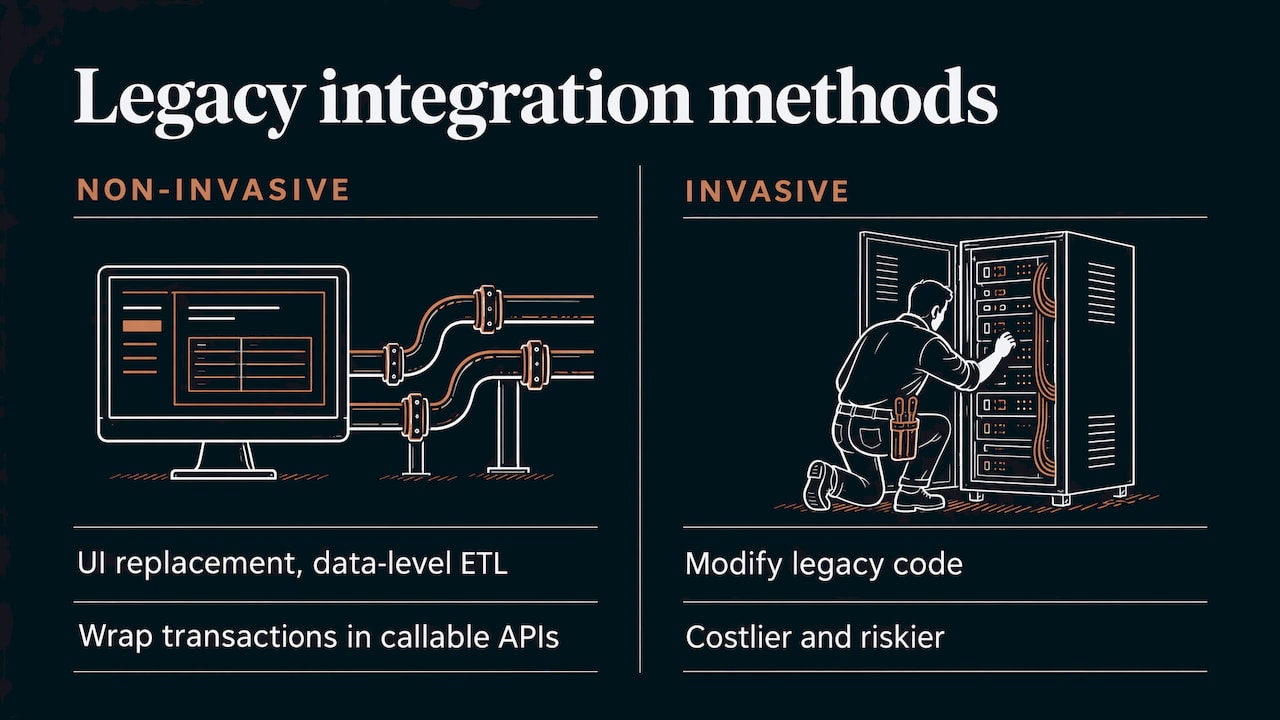
The older research and the current vendor guidance agree on the main families of approach. The Carnegie Mellon Software Engineering Institute lists screen scraping, database gateways, XML integration, database replication and object-oriented wrapping among the techniques engineers evaluate. A university guideline on integrating legacy applications splits them into non-invasive strategies (user-interface replacement, data-level ETL, and wrapping existing transactions in callable APIs) and invasive ones that modify legacy code. It notes that invasive approaches are costlier and riskier, which is why an iterative approach is recommended.
API wrapper
An API wrapper places a modern interface in front of the legacy function, so other applications call it without knowing what is behind. Microsoft’s API wrapper guidance walks through assessing the legacy components, defining OpenAPI specifications, publishing and securing the APIs, building the backend services, then testing, deploying and monitoring, with the back-end database left as it is. This suits stable systems that change rarely. In an ERP context it often takes the form of an OData service exposing orders, customers or inventory with defined read and write operations.
Database-level integration
Reading from, or replicating, the legacy database is the quickest route when no application interface exists. It works for reporting and lookups. Writing directly into tables is riskier, because it can bypass the validation the application normally applies. Where writes are needed, going through the application’s own interface or service is safer.
Middleware and messaging
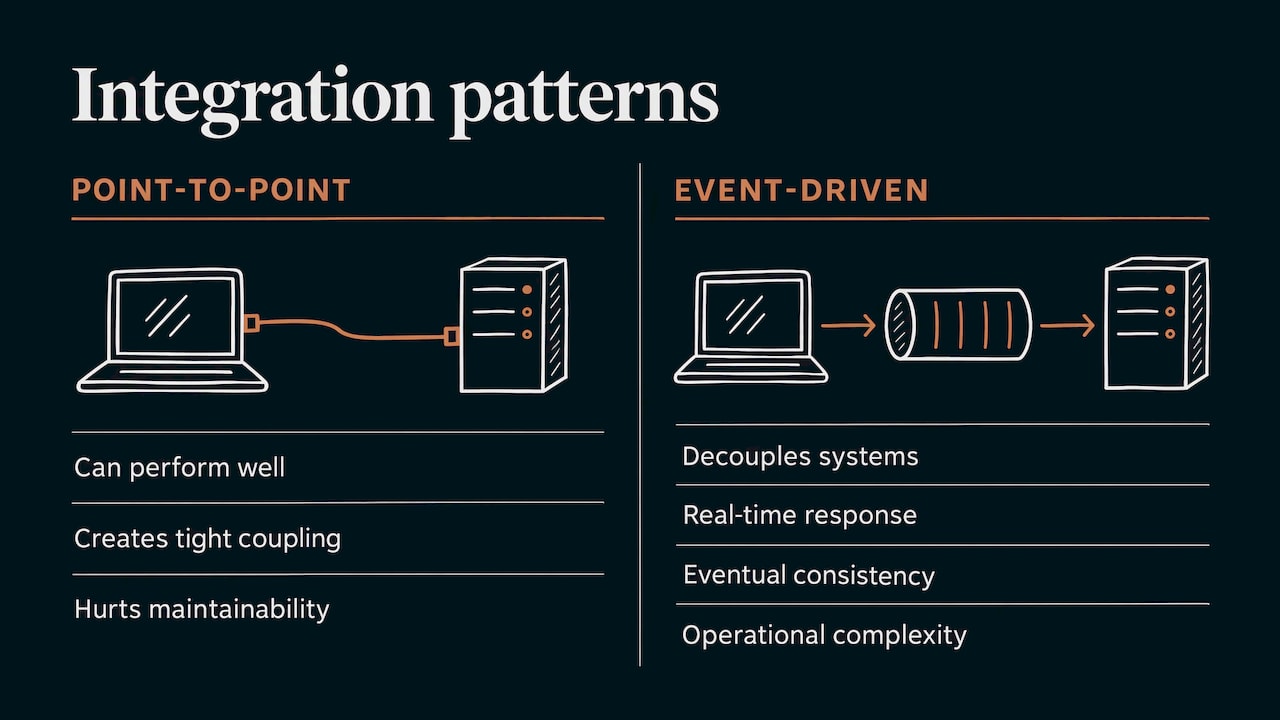
When several systems must talk to several others, a service bus or message broker sits in between. Amazon’s guidance describes direct connectors, REST APIs, hub-and-spoke middleware and asynchronous messaging or event-driven patterns as the main options, and notes that point-to-point connections can perform well but create tight coupling that hurts maintainability. Event-driven designs decouple systems and respond in real time, at the price of eventual consistency and more operational complexity.
The same source frames integration in three types: application-to-application, application-to-data and data-to-data. Knowing which type your use case is narrows the method quickly. A support agent that updates an order status is application-to-application. A weekly sales report is application-to-data.
For a deeper look at architectures that let older and newer systems coexist, see these integration architectures for legacy systems and the custom workflow patterns they describe.
User-interface automation
When a system offers neither an API nor safe database access, the only interface is the screen. Automating that interface is the least elegant method and the most fragile, since any screen change can break it. It is a bridge, not a destination, and it should be paired with logging so that failures are visible.
A plan that works in practice
The steps below follow the order used in most structured modernization guidance, adapted for teams whose goal is faster customer and operational handling.
- Inventory the system and its dependencies. List what data the legacy system owns (customers, orders, prices, stock), who reads and who writes it, and which other tools depend on it. Systems that fail in modernization often fail because they were never fully understood before commitment.
- Pick one workflow with a measurable outcome. Lead response time, order change handling, status inquiries and invoice lookups are typical. Define what success looks like in numbers before building: minutes to first reply, share handled without a person, error rate.
- Assign a source of truth per entity. Decide, entity by entity, which system wins when two disagree. Two systems writing the same field without a clear owner produce silent conflicts that surface weeks later.
- Inspect the real interface limits. Check rate limits, batch windows, authentication quirks and the fields the system actually validates. Documentation and reality often differ in older systems.
- Choose the exchange method. API wrapper, scheduled sync, file exchange or event messaging, matched to how fresh the data must be. An order status lookup needs near-real-time reads. A nightly report does not.
- Design failure handling first. Decide what happens on a timeout, a duplicate message, a partial update or a conflicting edit. Define what the automation does when it is unsure: refuse and escalate to a person, rather than guess.
- Pilot on a narrow slice. One product line, one region or one request type. Validate data throughout, with a rollback procedure and reconciliation checks agreed in advance.
- Expand in phases and monitor. Add request types and systems one at a time, review logs regularly, and retire manual steps only once the automated path has proven itself.
The pilot and phased approach are not caution for its own sake. They limit the cost of a wrong assumption about a system that was built years ago.
Risks to manage before you build
Security exposure
The Queensland Audit Office warns that unsupported systems may lack security patches and modern controls such as multifactor authentication, single sign-on, detailed logging, audit trails and stronger encryption. It suggests assessing the risk, restricting access and considering an intermediary layer. An integration layer can be that intermediary: the legacy system is reachable only through it, and every call is authenticated and logged.
Data quality and ownership
Integration exposes inconsistencies that were hidden when each system was used alone: duplicate customers, mismatched identifiers, fields used for purposes they were never meant for. A Forrester study commissioned by Microsoft lists data inconsistency, silos, poor workflow visibility, manual errors and insufficient governance among the typical integration problems. Agree identifiers early, and clean the entities the pilot touches before connecting them.
Overload and tight coupling
Legacy systems were not built for the request volumes that web and messaging channels can generate. Throttling at the integration layer protects them. Loose coupling through a wrapper or a queue also means the legacy system can later be replaced without rewriting every connected tool.
Unknown behavior
The hardest risk is the system itself: business rules buried in code, batch jobs that run overnight, side effects nobody documented. This is the reason to map behavior on a narrow slice first, and to keep a person in the loop on anything the automation cannot classify with confidence.
What integration returns
Benefits depend on the case, and published figures are modeled, not guaranteed. An academic case study from AIS eLibrary describes an integration layer that aggregated data from siloed legacy applications, reduced duplication, supported validation and connected external applications through APIs. The gain was organizational as well as technical: more transparent processes across units. A 2024 IBM Total Economic Impact study models 33% to 67% less time on integration projects and 40% less application downtime for a composite organization. Those are results for that modeled company, so use them as a prompt to set your own targets, not as a forecast.
For customer-facing teams, the benefit is more concrete. Once the ERP or CRM is reachable, the following can run without someone retyping data:
- a new lead is logged, enriched and answered within minutes, in the lead’s own language;
- an order status question on WhatsApp or by email is answered from live ERP data;
- an order change request is checked against status fields and delivery blocks, then applied, drafted for review or refused and escalated;
- a manager asks for a report and gets it from the system of record.
The order change case is covered step by step in our article on handling order change requests by email.
Where AI agents fit in an integration
An integration layer moves data. It does not decide what to do with an incoming message. That is the gap an AI agent fills: it reads a request in voice, WhatsApp or email, identifies what is being asked, checks the rules, and acts through the interface the integration provides.
The design questions are the same ones the integration plan raises. Which actions may the agent take alone? Which require approval? What does it do when data conflicts or the request falls outside its rules? A well-scoped agent answers each of these explicitly, with a human handoff and an audit log of every action, which also addresses the logging gaps that older systems often have. Our guides on enterprise AI implementation and AI adoption challenges set out the stages, and the governance policy template covers who approves what.
For teams working in SAP, the same logic applies to reporting: asking SAP data a question in plain language, instead of waiting for a custom report.
Our perspective
Most integration projects we scope start with a system the customer trusts and a process around it that has become a bottleneck. The ERP is correct. The people are capable. The delay is in the handoff: a lead waits for a reply, an order change waits for someone to find the right screen.
We build custom agents, not generic chatbots, because the value is in the rules. An agent acts on rules mapped to the company’s actual data and processes, with a human handoff where judgment is needed and fully auditable logs of what it did. The agent reduces workload. It does not replace the people who own the outcome.
We begin from the business problem, not the technology, and we stay accountable for the workflow’s results after launch. That is why we favor a narrow first deployment with measured results, then phased expansion. A legacy system rewards that discipline: every wrong assumption is found early and cheaply.
The same agents work around the clock in over 70 languages, which matters when the customer base is wider than the support team’s shifts.
Suyash
Getting started with VoxDonna
If the integration question comes from a concrete workflow, such as lead follow-up, customer support or order processing, the first step is an assessment of which processes suit automation and what the legacy system can expose. Our AI automation consulting covers that assessment, and AI agent development covers the build and deployment of agents connected to your ERP or CRM.

For voice and WhatsApp agents, published pricing starts with a one-time setup of €1,500 for Starter and €2,500 for Growth, and monthly plans from $20. Enterprise scopes are quoted individually.
FAQ
How long does legacy system integration take?
It depends on the interface the system offers and the number of workflows involved. A narrow pilot on one request type is a matter of weeks in many cases, while a multi-system program runs in phases over months. Scoping the interface constraints first gives the most reliable estimate.
Do we need to replace our ERP before adding AI?
No. If the ERP is stable and has a usable interface, an agent can work through it with rules and logs. Replacement can be considered separately, and an integration layer makes a later move easier because other tools no longer depend on the old system directly.
Is it safe to give an automated agent write access?
It is safe when the permissions are scoped and the failure behavior is defined. Typical designs let the agent apply low-risk changes, prepare drafts for review on medium-risk ones, and refuse and escalate the rest, with every action logged for audit.
What is the difference between an API wrapper and middleware?
A wrapper exposes one legacy system through a modern interface. Middleware sits between many systems and routes, transforms and queues messages among them. Wrappers suit a single stable system, middleware suits several-to-several connections.
Sources
- Inside the Hidden World of Legacy IT Systems, IEEE Spectrum
- 6 reasons legacy systems are still in use, TechTarget
- How you can manage the risk of your legacy systems, Queensland Audit Office
- Integration architectures between mainframe and AWS for coexistence
- Patterns of Legacy Displacement, Martin Fowler
- A Survey of Legacy System Modernization Approaches, Carnegie Mellon SEI
- Guideline: Integrating Legacy Applications Into Modern Architectures
- Modernize applications using an API wrapper, Microsoft Learn
- Overcoming Multi-Legacy Application Challenges, AIS eLibrary
- The Total Economic Impact of IBM Integration, 2024
- The Total Economic Impact of Microsoft Azure Integration Services, Forrester, 2023