Call Center Automation with AI: What to Automate and How
How AI call center automation works, which calls and tasks to automate first, what the evidence shows, and how to roll it out with human handoff and audit logs.

AI call center automation means software agents that answer, qualify, route and resolve customer contacts, then write the outcome back into your CRM or ERP, with a human taking over when the case requires it. The approach that holds up in production is not a generic chatbot placed in front of the queue. It is an agent built on your own rules and data, connected to your systems, with a defined handoff and a log of every action. That is how we build agents at Voxdonna, and the rest of this article explains why the design matters and how to apply it.
TL;DR
- AI automation covers repetitive inquiries, lead follow-up, status updates and system entries first, and passes complex or sensitive cases to people with the context attached.
- Published evidence supports the productivity case: a peer-reviewed study of 5,172 agents found a 15% average rise in issues resolved per hour with AI assistance.
- Escalation rises sharply with complexity, so the scope of automation should be chosen by case type, not by channel.
- Start with a baseline of your own metrics, automate a few high-volume workflows, and keep handoff rules and audit logs from day one.
- Trust, not technology, is the biggest adoption barrier, which makes transparent logic and human-in-the-loop design a requirement.
Table of Contents
- What AI call center automation is and how it works
- Which tasks and channels to automate, and which to keep human
- What AI agents do in service and sales workflows
- What the evidence says about results
- Will AI replace call center agents?
- How to implement call center automation, step by step
- Compliance in the United States
- Estimating the financial return
- What it costs with Voxdonna
- Our perspective
- Where to start
- FAQ
- Sources
What AI call center automation is and how it works
A traditional call center runs on queues: a contact arrives, waits, reaches an agent, and the agent looks up data in several systems, answers, and records the result. Automation removes work from each of those stages. Three layers are usually involved:
- Conversation layer. A voice, WhatsApp, chat or email agent understands the request in the customer’s language and replies.
- Decision layer. Rules map the request to the right action: answer from a knowledge base, check an order status, book an appointment, refuse, or escalate.
- Integration layer. The agent reads from and writes to the CRM, ERP, ticketing or calendar system, so the work is finished and not merely discussed.
The third layer is what separates automation from deflection. A bot that tells a customer to “check the portal” has moved the problem. An agent that looks up the order, confirms the delivery status and updates the record has closed it.
Call center automation now extends beyond the phone. Customers write on WhatsApp, send email and call, and the same workflow should run across all three, in the customer’s own language. Our agents operate around the clock in more than 70 languages, which matters for businesses whose customers are not all in one time zone or one language.
Which tasks and channels to automate, and which to keep human
The useful question is not “which channel” but “which type of case.” Sort your contact reasons into three groups.
| Case type | Examples | Automation approach |
|---|---|---|
| Routine and rule-based | Order status, opening hours, appointment booking, document requests, price lists | Fully automated, logged, with a path to a person on request |
| Process-driven with data lookups | Lead qualification and follow-up, order changes, CRM and ERP updates, reporting, data extraction | Automated within defined rules, with escalation when a rule is not met |
| Complex or sensitive | Disputes, complaints with legal or financial exposure, unusual technical faults, distressed customers | Human-led, with the agent preparing a summary and context |
The boundary is not fixed by technology alone. It is set by how you write the rules. A good agent refuses what falls outside them and escalates, instead of guessing.
The pattern in the data is consistent. A 2026 study of 9,177 customer touchpoints in an AI-enabled telecom contact center found that escalation to human agents rose from 5.3% for low-complexity inquiries to 87.0% for high-complexity ones. That is the system working as designed: simple cases are resolved by the agent, hard ones reach a person. It also tells you how to forecast the effect. The more of your volume is routine, the more an automation project can take off your team.
We looked at this question on real traffic: our analysis of 10,000 business calls found that 73% could be handled by AI. Your own mix will differ, which is why an assessment of your call reasons comes before any build.
What AI agents do in service and sales workflows
Customer support
Support agents handle the repetitive inquiries that fill queues: where an order is, how to change a delivery, which documents are needed, what a warranty covers. In a voice deployment, the agent answers the call, identifies the customer, checks the system and either completes the request or hands over with the conversation transcript. Our guide to voice AI customer service covers the deployment steps in more detail.
Sales and lead follow-up
Slow response to a new lead is a common reason for lost deals, and it is a task that automation handles well. Bitkom’s March 2026 whitepaper on agentic AI in customer experience reports that in sales, AI agents pre-qualify leads, consolidate CRM, email and meeting data, and initiate follow-up actions. For a sales team, this means every inquiry gets a first response immediately, and the salesperson receives a prepared record instead of a raw contact. See also our overview of AI agents for sales teams for tasks, controls and metrics.
Examples of agents taking over sales and customer-experience tasks are collected in this piece on agentic AI in customer engagement.
Back-office and operations
Much of call center cost sits after the call: updating the ERP, writing notes, changing an order, producing a report. Agents that write directly into these systems remove the after-call work. Operations teams use the same approach for order processing, reporting and data extraction, including OCR on incoming documents.
What the evidence says about results
Two independent sources are worth knowing.
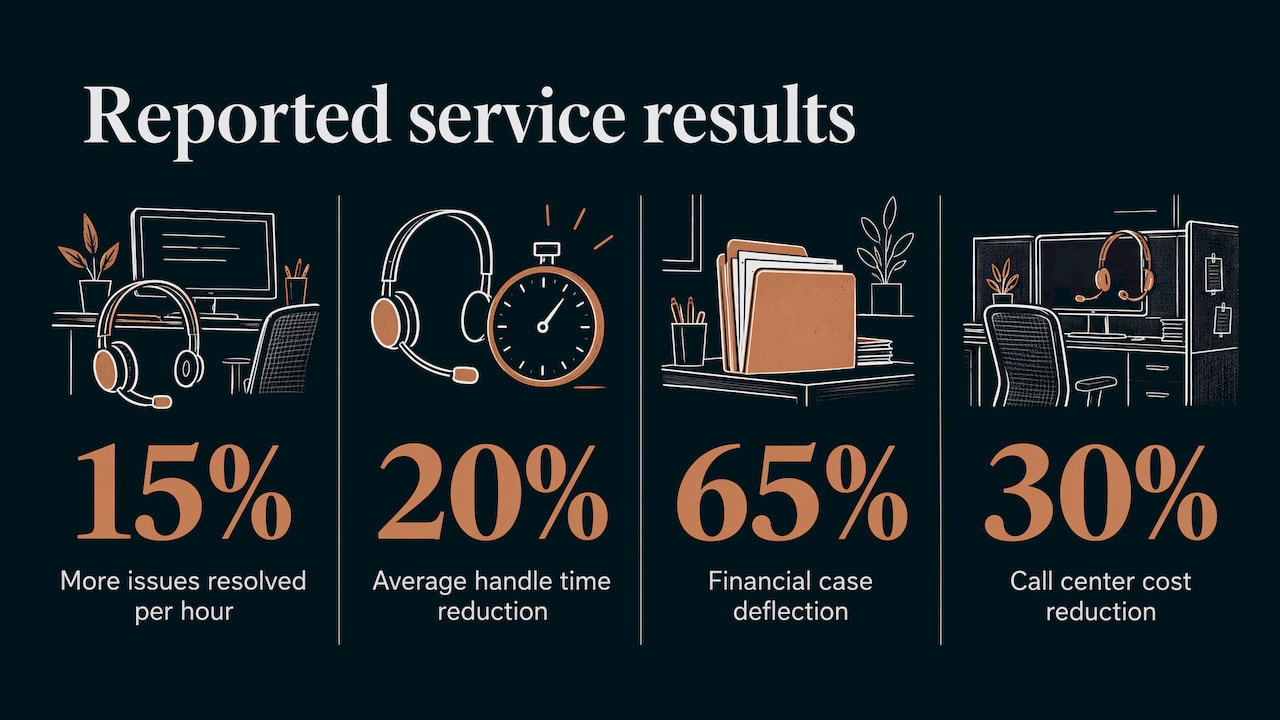
The first is academic. A study in the Quarterly Journal of Economics by Brynjolfsson, Li and Raymond found that generative AI assistance raised issues resolved per hour by 15% on average across 5,172 agents, with larger gains for less experienced workers. The study measured AI assisting human agents. It shows that the underlying technology improves resolution speed and shortens the learning curve for new staff.
The second is a consulting view of agentic AI in service. BCG’s September 2025 report lists client results including a 20% average handle time reduction at a business process outsourcer, 65% case deflection at a financial institution, and a 30% reduction in call center cost at a health care company. These are results for specific clients and workflows, not a promise for every operation, but they indicate where the gains appear: handle time, deflection and cost per contact.
Both sources point to the same practice: measure before and after, on the metrics your business already uses.
Will AI replace call center agents?
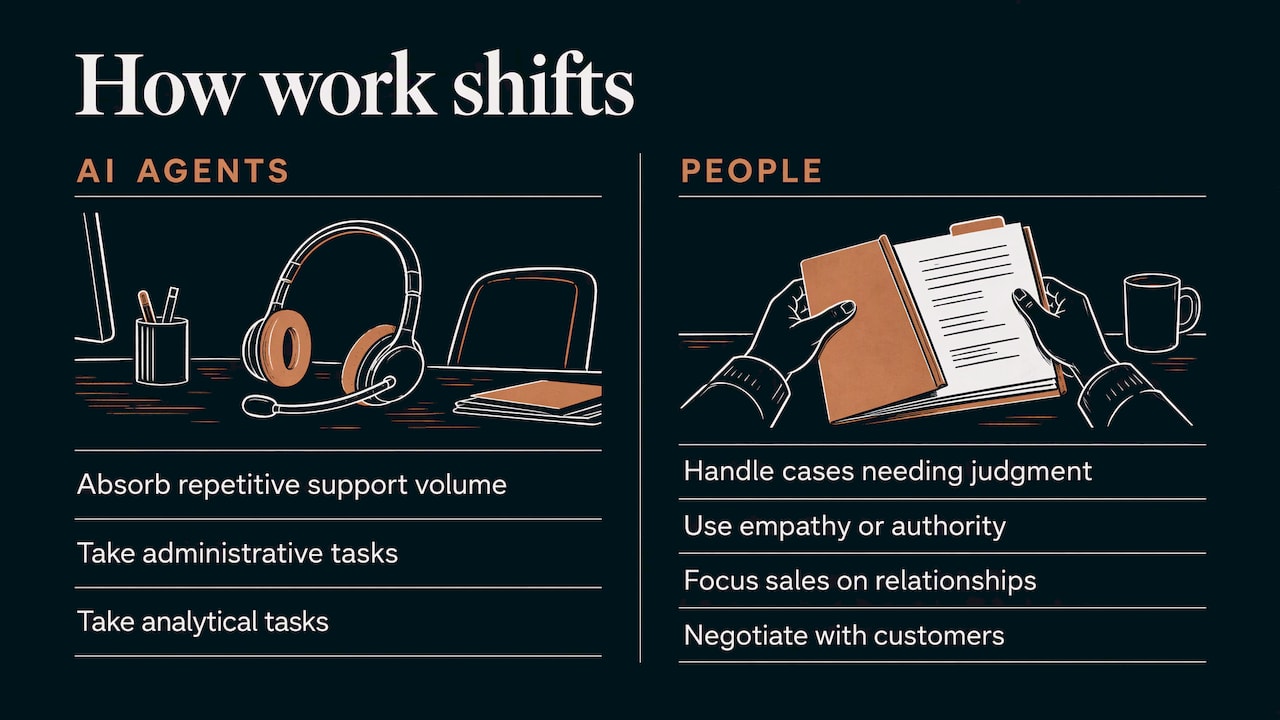
The evidence points to a change in the work, not its disappearance. Bitkom projects that in the medium term, sales roles will shift toward relationship and negotiation activities as agents take over administrative and analytical tasks. The same logic applies to support: the agent absorbs repetitive volume, and people handle the cases that need judgment, empathy or authority.
Our own aim is the same. We build agents to reduce workload without replacing human roles, and every agent includes human handoff.
How to implement call center automation, step by step
1. Baseline your current operation
Record average handle time, first-contact resolution, customer satisfaction, cost per contact, response time to new leads and backlog. Without a baseline, no result can be proven. This is also where an outside assessment pays off: our AI automation consulting starts from the business problem and identifies which processes are suitable for automation, instead of starting from a tool.
2. Classify contact reasons
Export three to six months of tickets, call logs or email subjects and group them by reason. Then mark each group as routine, process-driven or complex, using the table above. The groups with high volume and low complexity are your first candidates. Doing this by hand across thousands of contacts is slow and tends to miss the long tail of rare reasons, which is why we run it as part of scoping.
3. Map the rules and the data
For each chosen workflow, write down what the agent may do, what it may never do, which data it reads, what it writes, and when it must escalate. Rules mapped to your actual data and processes are what make an agent act consistently. Typical rule items include status fields, delivery blocks, approval thresholds and customer verification.
4. Design the handoff
Decide how the agent passes a case to a person: which queue, with which summary, and how quickly. Bitkom’s whitepaper finds that the greatest adoption barrier is trust rather than technology, requiring transparent logic and human-in-the-loop design. A handoff that carries the full context, so the customer never repeats themselves, is the practical answer to that barrier.
5. Integrate and build
Connect the agent to the CRM, ERP, telephony, WhatsApp and email. Our AI agent development work delivers production-ready agents that act inside these systems and keep fully auditable logs, so a reviewer can see what the agent did and why.
6. Pilot, then phase the rollout
Start with one or two workflows, run them for a defined period, compare against the baseline, then extend. Phased rollouts limit risk and give your team time to adjust.
7. Operate and review
Review logs, escalations and unresolved cases regularly, and tune the rules. Because we stay accountable for the workflow’s outcomes after launch, this review is part of the engagement and not left to the client alone.
Compliance in the United States
If your agents place outbound calls to US numbers, the rules on automated calling apply. The FCC ruled on February 8, 2024 that AI-generated voices count as “artificial” under the Telephone Consumer Protection Act, which brings them under the act’s consent requirements. Have your legal counsel confirm the consent and disclosure rules for each outbound campaign before launch. Auditable logs of every contact make consent records easier to maintain.
Estimating the financial return
Model the return on four lines: labor time recovered, quality improvement, revenue gained from faster lead response, and risk reduced. For labor, multiply contacts automated by the handle time you measured in the baseline and by your loaded cost per agent hour. For revenue, compare conversion on leads answered within minutes against your historical rate. For a practical walk through the financial side of automated phone answering, see this guide to AI receptionist benefits.
Keep the model conservative: count only the volume your classification showed to be routine, and keep the cost of ongoing operation in the calculation.
What it costs with Voxdonna
Our offer is scoped to workflow complexity and usage, and some channels have published plans. WhatsApp agents are listed on our WhatsApp agents page at $99 per month for Plus and $499 per month for Max, with Starter from $20 per month and Growth from $249 per month. Voice agents carry a one-time setup of €1,500 for Starter and €2,500 for Growth, listed on the voice agents page. Enterprise has no published price and is scoped individually.
Our perspective
Most call center automation projects fail at the same point: the tool was chosen before the process was understood. A generic chatbot answers questions, but it does not change a status field, release a delivery block or update a customer record under rules your business wrote.
We start from the problem. Which contacts consume your team’s hours, which of them follow rules, and where must a person decide? From that we build agents that work inside your CRM or ERP, across voice, WhatsApp and email, with human handoff and a log of every action.
We measure the same things you do: response time, handle time, resolution and cost per contact. And we stay accountable for the workflow after launch, because an agent that is deployed and forgotten drifts away from the process it was built for.
Suyash
Where to start
If your team spends its day on status questions, lead follow-up and system updates, a scoped pilot on the two or three highest-volume workflows is the fastest way to a measurable result. Our AI automation services cover the assessment, build, deployment and ongoing operation, and our AI agents for ecommerce show what this looks like for order-heavy businesses.

FAQ
How can AI be used in call centers?
AI answers routine inquiries by voice, WhatsApp and email, qualifies and follows up on leads, routes contacts, and updates the CRM or ERP after each interaction. It can also summarize calls for the human agent who takes over. The scope depends on the rules and data you give it.
Will AI replace call center agents?
The published evidence points to a shift in the work. Agents absorb administrative and repetitive tasks, and people concentrate on complex, sensitive and relationship-driven cases. Our agents are built to reduce workload, with human handoff for anything outside their rules.
What should we automate first?
Choose workflows with high volume, clear rules and available data: order status, appointment booking, lead follow-up and system updates. Classify your contact reasons first, then pick the two or three groups that are most routine.
How do we measure whether automation works?
Baseline average handle time, first-contact resolution, customer satisfaction, cost per contact and lead response time before launch. Compare the same figures at set intervals after launch, and review the escalation log to see which cases still need people.
Sources
- Generative AI at Work, Quarterly Journal of Economics
- Unlocking Impact from Agentic AI in Customer Service, BCG
- Agentic AI in Customer Experience, Bitkom whitepaper
- Limits of Automation in Contact Centers, IRJEMS
- FCC Rules AI-Generated Voices Are Artificial Under the TCPA